Thursday, June 19, 2025

Create API JSON Using Newtonsoft dll file on AX 2012 R3 CU8

 CLASS METHOD:

static str bodyJsonTransferSKN(    Amount amtValuex=0,

str currencyx='',

                                    str beneficiaryAccNox='',                                    

                                    str remarx='',

                                    str sourceAccountNox='', 

                                    str senderAccountNox='',

                                    str senderNamex=''

                               )

{

    str bodyRawJson;

    Counter                                 test;

    Newtonsoft.Json.Linq.JTokenWriter       writer;

    Newtonsoft.Json.Linq.JObject            jObject;

    ClrObject                               clrObject;

    TextIo                                  textIo;

    str                                     jsonStr, strDate, strTime;


    str amtValueStrx;

    str transDateStrx;


    ;


    amtValueStrx    = num2str(amtValuex,1,2,1,0);

    transDateStrx   = MyClass::getDateTimeZone();


    writer = new Newtonsoft.Json.Linq.JTokenWriter();


    writer.WriteStartObject();


    writer.WritePropertyName("sourceAccountNo");

    writer.WriteValue(sourceAccountNox);


    writer.WritePropertyName("beneficiaryAccountNo");

    writer.WriteValue(beneficiaryAccNox);


    writer.WritePropertyName("amount");


    writer.WriteStartObject();


        writer.WritePropertyName("value");

        writer.WriteValue(amtValueStrx);


        writer.WritePropertyName("currency");

        writer.WriteValue(currencyx);


    writer.WriteEndObject();


    writer.WritePropertyName("transactionDate");

    writer.WriteValue(transDateStrx);


    writer.WritePropertyName("remark");

    writer.WriteValue(remarx);


    writer.WritePropertyName("additionalInfo");


    writer.WriteStartObject();


        writer.WritePropertyName("senderAccountNo");

        writer.WriteValue(senderAccountNox);


        writer.WritePropertyName("senderName");

        writer.WriteValue(senderNamex);


    writer.WriteEndObject();


    writer.WriteEndObject();


    clrObject   = writer.get_Token();

    jObject     = clrObject;


    jsonStr     = jObject.ToString();


    bodyRawJson = jsonStr;


    return bodyRawJson;

}

CLASS METHOD:

static str getDateTimeZone()

{

    str         transDateStrx;

    utcDateTime systemDateTimex, currentDateTimex;

    Timezone    tzUserx;

    int         diffTimeMinutex, diffTimeHourx;


    ;


    systemDateTimex     = DateTimeUtil::getSystemDateTime();

    tzUserx             = DateTimeUtil::getUserPreferredTimeZone();


    diffTimeMinutex     = DateTimeUtil::getTimeZoneOffset(currentDateTimex, tzUserx);

    diffTimeHourx       = diffTimeMinutex/60;


    currentDateTimex    = DateTimeUtil::applyTimeZoneOffset(systemDateTimex, tzUserx);

    transDateStrx       = DateTimeUtil::toStr(currentDateTimex);


    transDateStrx       = strfmt('%1+0%2:00', transDateStrx, diffTimeHourx) ;


    return transDateStrx;

}


RESULT:

json result: 

{

  "sourceAccountNo": "",

  "beneficiaryAccountNo": "",

  "amount": {

    "value": "250000.00",

    "currency": "AAA"

  },

  "transactionDate": "2025-06-20T11:03:44+07:00",

  "remark": "",

  "additionalInfo": {

    "senderAccountNo": "",

    "senderName": ""

  }

}


Thursday, May 11, 2023

Extension button confirm purchase order on D365FO

[ExtensionOf(formControlStr(PurchTable, buttonConfirm))]

final class PurchTable_buttonConfirm_Extension

{

    public void clicked()

    {

        FormControl callerButton = any2Object(this) as FormControl;

        FormRun formRun = callerButton.formRun();

        FormDataSource purchTable_ds = formRun.dataSource(tablestr(PurchTable));

        PurchTable purchTable = purchTable_ds.cursor();


        info(strFmt('Before next PurchId %1', purchTable.PurchId ));


        next clicked();


        info(strFmt('After next PurchId %1', purchTable.PurchId ));

    }

}

Monday, September 26, 2022

Can not delete Main Account in D365FO. Main account XXXXXX is used 10 times as a default account on the Item groups(InventItemGroupForm) table in the Main account field.

When You try to delete Main Account and got error log as below: 


Main account Z116101 is used 10 times as a default account on the Item groups(InventItemGroupForm) table in the Main account field.

A financial dimension value is based on the Z116101 record and has been used on a transaction. You cannot delete the Z116101 record

But in Item Group setup form (or in Inventory posting) the Main account is not exist (not used by any Item group).


Solution for my case, 

 I had customized table : InventItemGroupForm, then show (visible) field: ItemGroupId.


Item Group Id: STG02A, is not shown on form. 

To delete the data in table InventItemGroupForm, create Item group Id with form InventItemGroup, use value: STG02A.

After you created item group id, all records related to Item group Id is deleted, then you can delete the Item group Id and delete the Main account related. 


Monday, August 29, 2022

Compare event handler when close child form with record value from caller form for D365FO

 class CustOpenTrans_form_Exthandler

{

    [PreHandlerFor(formStr(CustOpenTrans), formMethodStr(CustOpenTrans, close))]

    public static void CustOpenTrans_Post_close(XppPrePostArgs args)

    {        

        FormRun sender = args.getThis();

        CustTransOpen custTransOpen = sender.dataSource(formdatasourcestr(CustOpenTrans, CustTransOpen)).cursor();

        LedgerJournalTrans ljt = sender.args().record();

        info('Event: CustOpenTrans_Post_close');

        info(strFmt('Ledgertrans voucher %1',ljt.Voucher));

    }


    [FormControlEventHandler(formControlStr(CustOpenTrans, Save), FormControlEventType::Clicked)]

    public static void Save_OnClicked(FormControl sender, FormControlEventArgs e)

    {

        LedgerJournalTrans ljt = sender.formRun().args().record();        

        info('Event: Save_OnClicked');

        info(strFmt('Ledgertrans voucher %1',ljt.Voucher));


    }


    [FormEventHandler(formStr(CustOpenTrans), FormEventType::Closing)]

    public static void CustOpenTrans_OnClosing(xFormRun sender, FormEventArgs e)

    {

        LedgerJournalTrans ljt = sender.args().record();      

        info('Event: CustOpenTrans_OnClosing');

        info(strFmt('Ledgertrans voucher %1',ljt.Voucher));

    }

}

Sunday, August 28, 2022

Get caller datasource, click button closeOK in form CustOpenTrans, get caller record of form LedgerJournalTrans for D365FO

 class CustOpenTrans_form_Exthandler

{


    [PostHandlerFor(formStr(CustOpenTrans), formMethodStr(CustOpenTrans, closeOk))]

    public static void CustOpenTrans_Post_closeOk(XppPrePostArgs args)

    {

        FormRun sender = args.getThis();

        CustTransOpen custTransOpen = sender.dataSource(formdatasourcestr(CustOpenTrans, CustTransOpen)).cursor();


        LedgerJournalTrans ljt = sender.args().record();

        info(strFmt('Voucher: %1', ljt.Voucher ));

    }


}

Monday, August 15, 2022

Extension on modified form field for D365FO

 class PriceDiscAdmTable_ExtHandler

{

      [FormDataFieldEventHandler(formDataFieldStr(PriceDiscAdm, PriceDiscAdmTrans, relation), FormDataFieldEventType::Modified)]

    public static void relation_OnModified(FormDataObject sender, FormDataFieldEventArgs e)

    {

        FormDataSource priceDiscAdmTrans_ds = sender.datasource();

        PriceDiscAdmTrans _priceDiscAdmTrans = priceDiscAdmTrans_ds.cursor();


        if( _priceDiscAdmTrans.relation != PriceType::LineDiscPurch && 

            _priceDiscAdmTrans.relation != PriceType::PricePurch &&

            _priceDiscAdmTrans.relation != PriceType::LineDiscSales &&

            _priceDiscAdmTrans.relation != PriceType::PriceSales

          )

        {

            error('Relation: Only price or line discount is valid selection!');

            throw exception::Error;

        }

    }

}

Extension add table field method display name for D365FO

 public static class PriceDiscAdmTrans_Extension

{

    [SysClientCacheDataMethodAttribute(true)]  //This attribute will cache your display method.

    public static display Name My_ItemName(PriceDiscAdmTrans _this)

    {

        return InventTable::find(_this.ItemRelation).productDescription('en-us');

    }

}

Import file TXT using job class in D365FO

 class JOB_ImportUOM

{        

    public static void main(Args _args)

    {        

        UnitOfMeasure                       _uom;

        UnitOfMeasureConversion             _uomConvert;

        UnitOfMeasureTranslation            _uomTranslation;

        UnitOfMeasureClass                  uomClass;


        container                           rec;

        TextStreamIo                        file;

        FileUploadTemporaryStorageResult    fileUpload;


        str                                 fromUnitx,toUnitx,fromUnitNamex,toUnitNamex,classUnitx;

        int                                 sep;

        int                                 counterx,i;

        ;

        fileUpload = File::GetFileFromUser() as FileUploadTemporaryStorageResult;

        file = TextStreamIo::constructForRead(fileUpload.openResult());


        try

        {

            if (file)

            {

                if (file.status())

                {

                    throw error("@SYS52680");

                }

                file.inFieldDelimiter('^');

                //file.inRecordDelimiter('\r\n');

            }


            while (!file.status())

            {

                rec = file.read();


                fromUnitx                          = conPeek(rec, 1);

                fromUnitNamex                      = conPeek(rec, 2);

                classUnitx                         = conPeek(rec, 3);


                _uom = UnitOfMeasure::findBySymbol(fromUnitx);


                if(!_uom)

                {


                    ttsBegin;

                    _uom.clear();

                    _uom.Symbol = fromUnitx;


                    switch(classUnitx)

                    {

                        case 'Length':

                            uomClass = UnitOfMeasureClass::Length;

                            break;


                        case 'Liquid volume':

                            uomClass = UnitOfMeasureClass::LiquidVolume;

                            break;


                        case 'Mass':

                            uomClass = UnitOfMeasureClass::Mass;

                            break;


                        case 'Quantity':

                            uomClass = UnitOfMeasureClass::Quantity;

                            break;


                        default:

                            uomClass = UnitOfMeasureClass::Quantity;

                            break;


                    }

                    _uom.UnitOfMeasureClass =   uomClass;

                    _uom.IsInventUnit = NoYes::Yes; // custom field

                    _uom.validateWrite();

                    _uom.insert();

                    ttsCommit;


                    ttsBegin;

                    _uomTranslation.clear();

                    _uomTranslation.UnitOfMeasure = _uom.RecId;

                    _uomTranslation.Description = fromUnitNamex;

                    _uomTranslation.LanguageId = 'en-us';

                    _uomTranslation.validateWrite();

                    _uomTranslation.insert();

                    ttsCommit;


                    //info(strFmt("%1 %2 %3 %4",fromUnitx,classUnitx,_uom.Symbol, _uomTranslation.Description));

                    counterx++;

                }


            }

            info('Import success!');            

        }

        //try

        catch

        {

            error("Error!");

            return;

        }

        info(strFmt("Done! %1 records is imported !",counterx));

    }

}

Tuesday, July 6, 2021

Create XML with data from CustTrans table

 static void Create_XML(Args _args)
{
    XmlDocument doc;
    XmlElement  nodeXml;
    XmlElement  nodeTable;

    CustTrans   _custTrans;
    #define.filename(@"D:\Output\TEST_CREATE.xml")
    ;
    doc     = XmlDocument::newBlank();
    nodeXml = doc.createElement('CustomerVoucher');
    doc.appendChild(nodeXml);

    while select * from _custTrans
    where _custTrans.AccountNum == '10002'
    {
        nodeTable = doc.createElement('DocumentNumber');
        nodeXml.appendChild(nodeTable);
        nodeTable.appendChild(doc.createTextNode(
_custTrans.DocumentNum) );

        nodeTable = doc.createElement('VoucherNumber');
        nodeXml.appendChild(nodeTable);
        nodeTable.appendChild(doc.createTextNode(_custTrans.Voucher) );
    }
    doc.save(#filename);

}

Create LedgerJournalTrans with Marked Settlement Vendor for AX 2009

 
static void Create_AP_JournalSettlement_AX(Args _args)
{
    /** Add Ledger type : Vendor lines with marking of open vendor transaction to existing Journal Table for AX 2009 **/
    /** Using custom class to create LedgerJournalTrans **/
    
    LedgerJournalTrans              _ljt, _ljt2;
    VendTransOpen                   _vto;
    VendTrans                       _vt;

    CustVendOpenTransManager    manager;
    container                   conVchx;
    JournalId                   jourNumx;
    TransDate                   transDatex, docDatex, dueDatex;
    Amount                      totSettledx;
    Str 20                      invoiceNumx;
    RecId                       ljtRecIdx;
    AccountNum                  accNumx;
    ;
    jourNumx = '20-0002940';
    transDatex = today();
    invoiceNumx = '12345';
    accNumx     = 'V0008';
   
    if(!LedgerJournalTable::find(jourNumx).Posted)
    {
        delete_from _ljt where _ljt.JournalNum == jourNumx;
    }

    _ljt = AX_LedgerJournal::createJournalLines(jourNumx, '', transDatex, docDatex, dueDatex,
                    'Vendor',accNumx,0,0,'Ledger','','','','','','1.PRO');

    ljtRecIdx = _ljt.RecId;
    manager = CustVendOpenTransManager::construct(_ljt);
    manager.resetMarkedTrans();

    while select * from _vto
    join Invoice from _vt
    where _vto.RefRecId == _vt.RecId
       && _vto.AccountNum == _vt.AccountNum
       && _vt.AccountNum == accNumx
       && _vt.Invoice == _invoiceNumx
    {
        manager.updateTransMarked(_vto, true);
        totSettledx = manager.getMarkedTotalDisplayCur();
        info(strfmt('%1 %2 %3', _vto.AccountNum, _vt.Invoice, totSettledx));
    }

    ttsBegin;
    _ljt.MarkedInvoice = '';//ctcheck.Invoice;
    _ljt.SettleVoucher = SettlementType::SelectedTransact;
    _ljt.Txt = strfmt('Invoicing %1',transDatex);
    //_ljt.DocumentNum = strfmt('%1',invoiceNumx);

    if(totSettledx > 0)
    { _ljt.AmountCurCredit =  abs(totSettledx); }
    else
    { _ljt.AmountCurDebit =  abs(totSettledx); }
    _ljt.update();
    ttsCommit;
    
    _ljt2 = AX_LedgerJournal::createJournalLines(jourNumx, _ljt.Voucher,transDatex, docDatex, dueDatex,
                    'Vendor',accNumx,0,abs(totSettledx),'Ledger','','',invoiceNumx,'',_ljt.Txt, '2.INV');


}

Friday, July 3, 2020

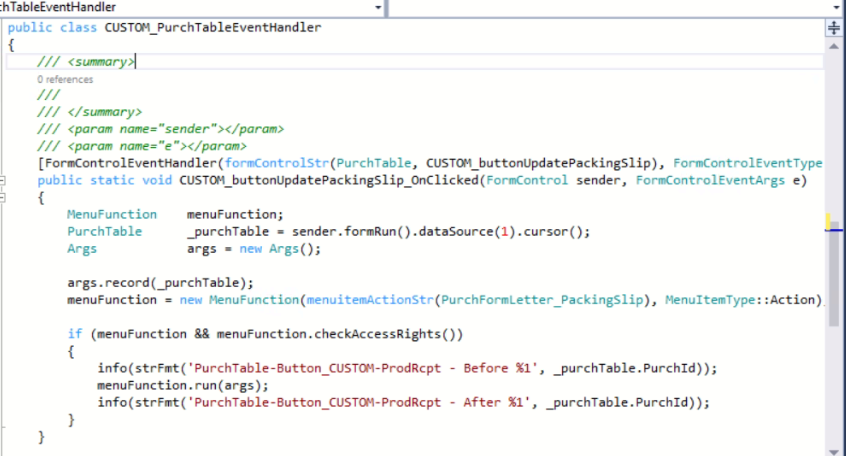
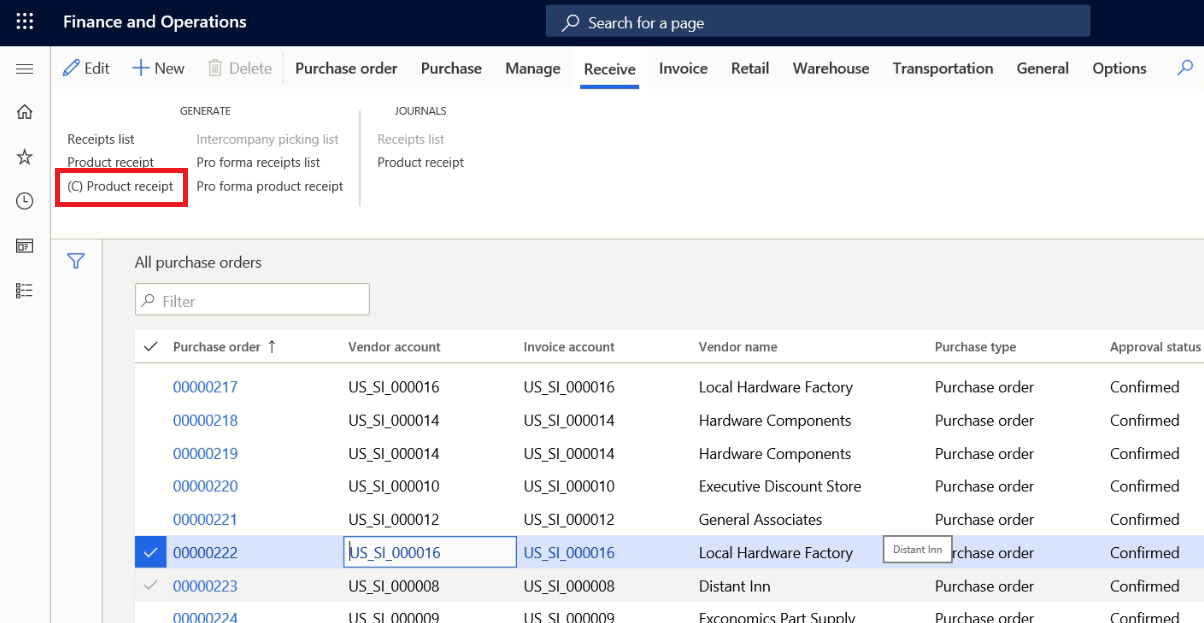
Add custom button to run existing MenuItemButton on Dynamics 365FO and related event handler behaviour

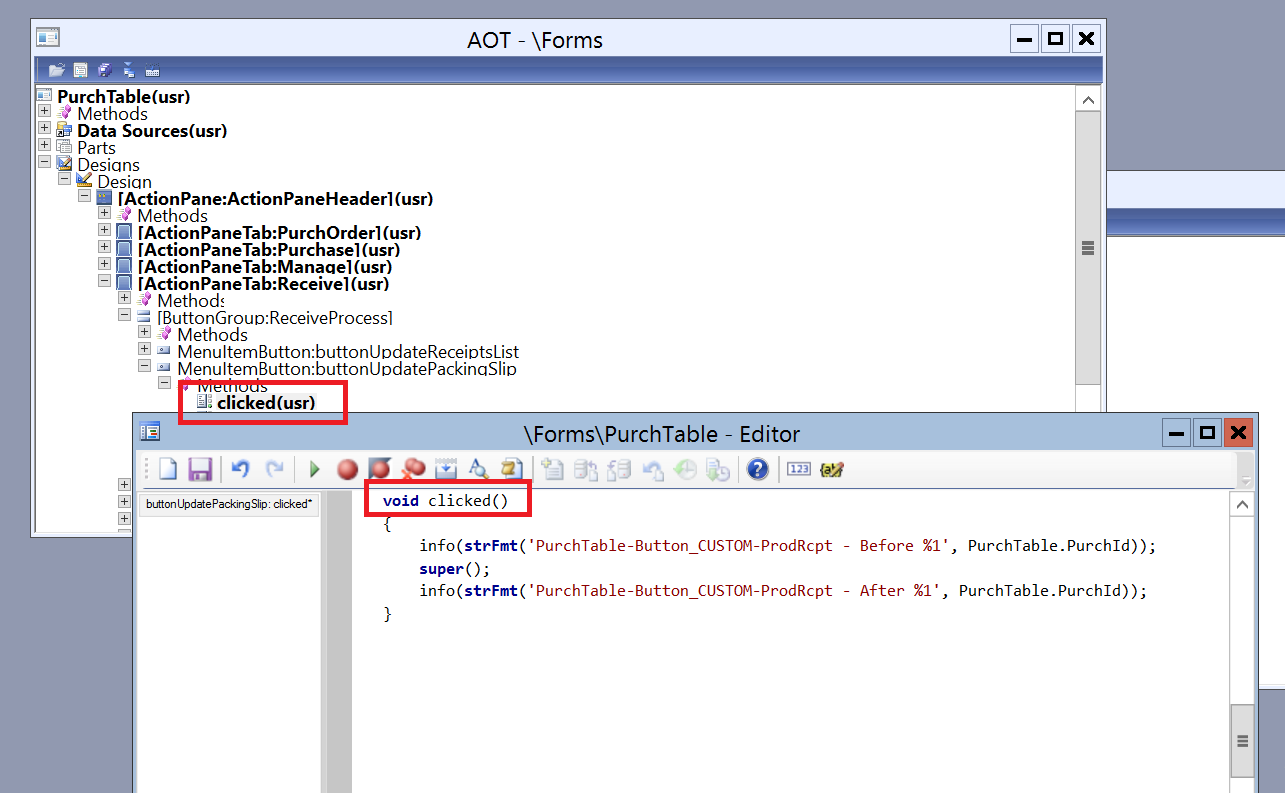
In this example, in AX 2012, we write this code to override process a menu item button in PurchTable form (buttonUpdatePackingSlip) .

clicked()
{   
        //Process Before
        super();

       //Process After
}


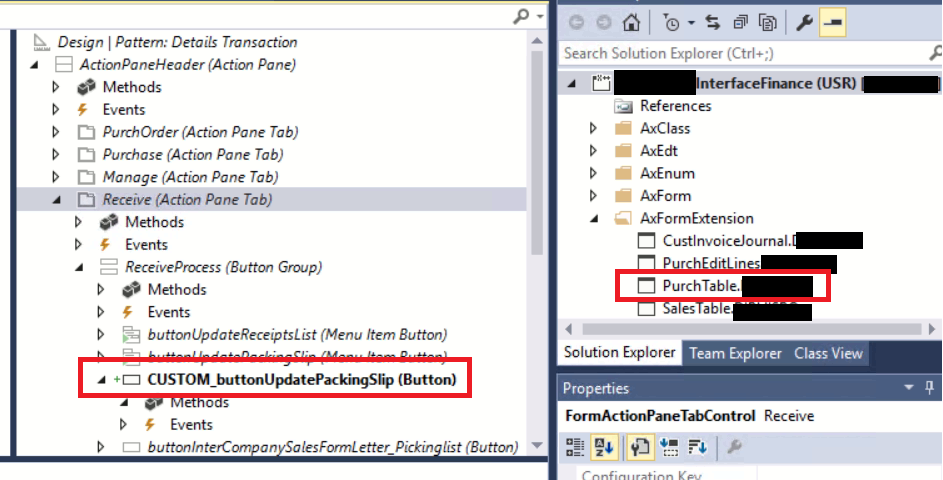
In D365FO we could handling with Extension within these steps:
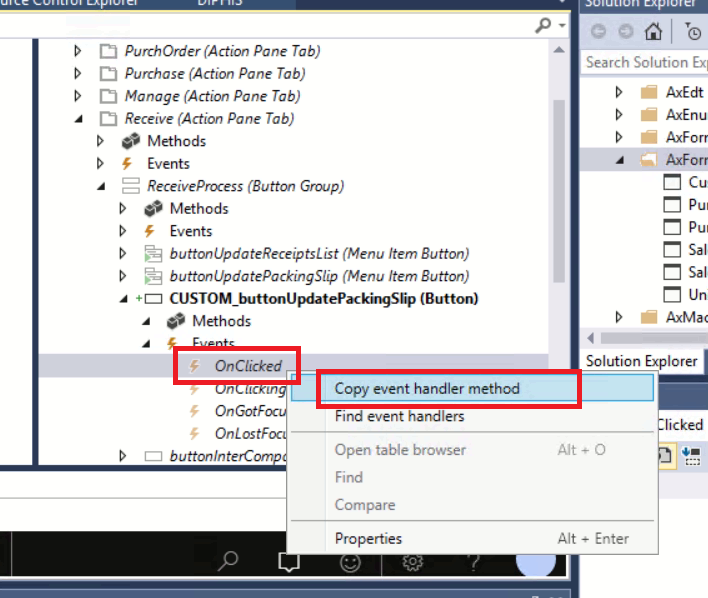
1. Create Extension of PurchTable form, add new button


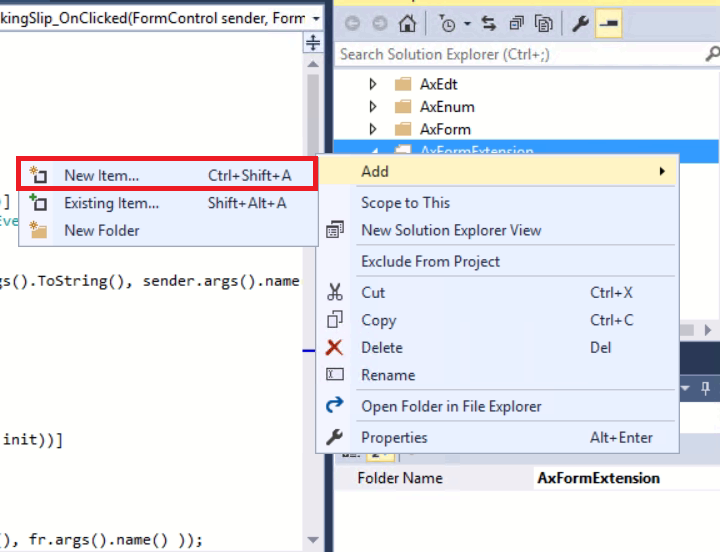
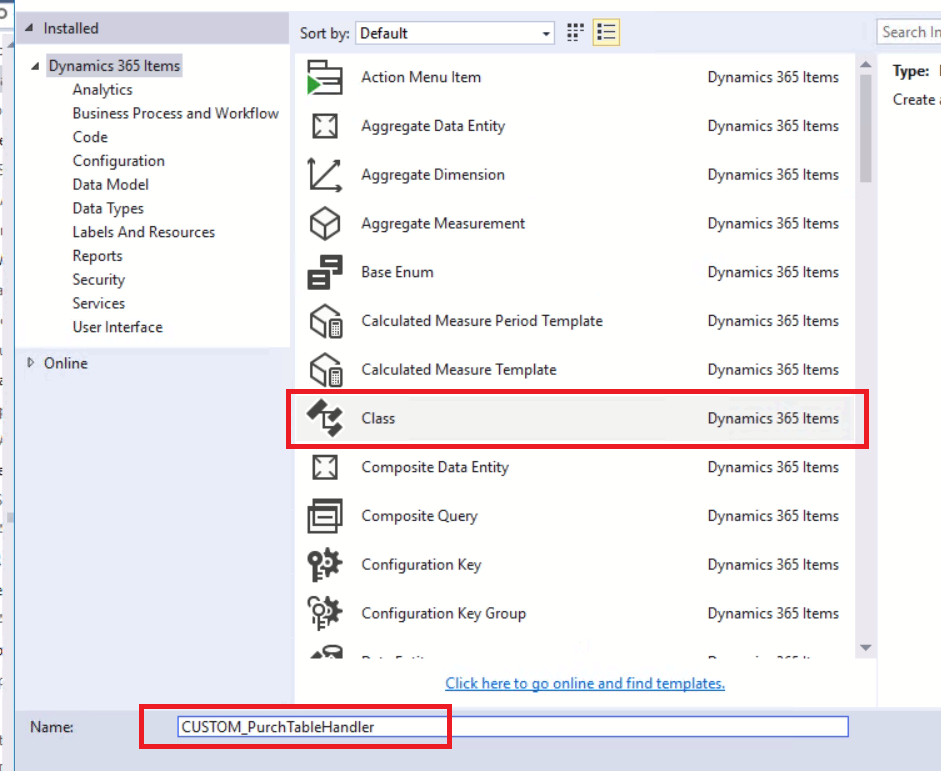
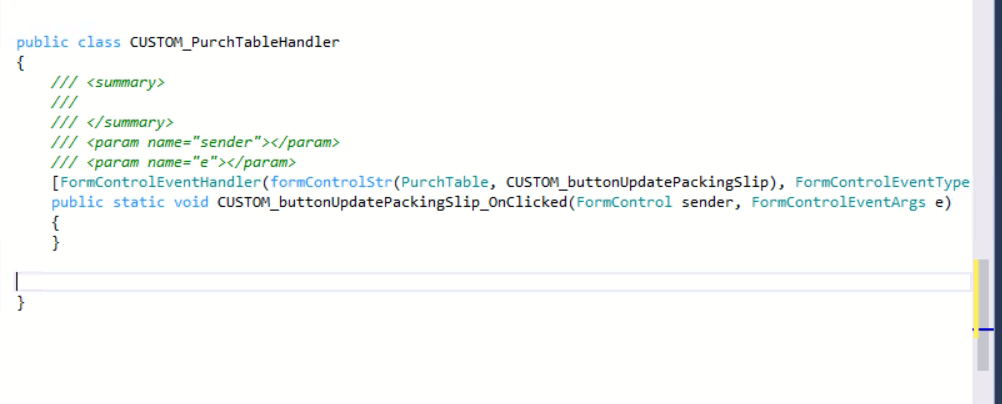
2. Create new class for handling PurchTable event handler


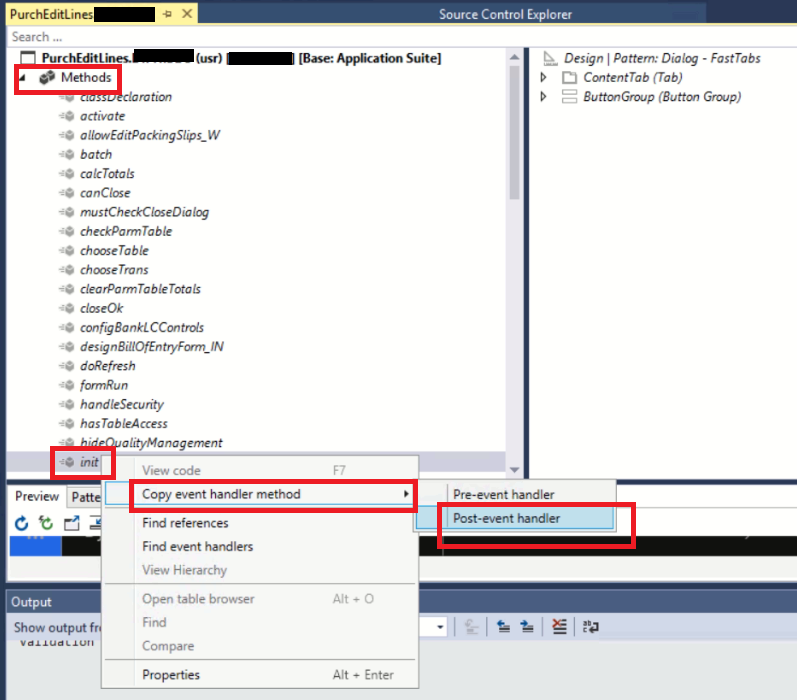
3.  Copy Event handler method from new created button on PurchTable


4. Paste to the created class


5. Update the class


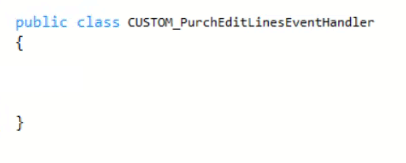
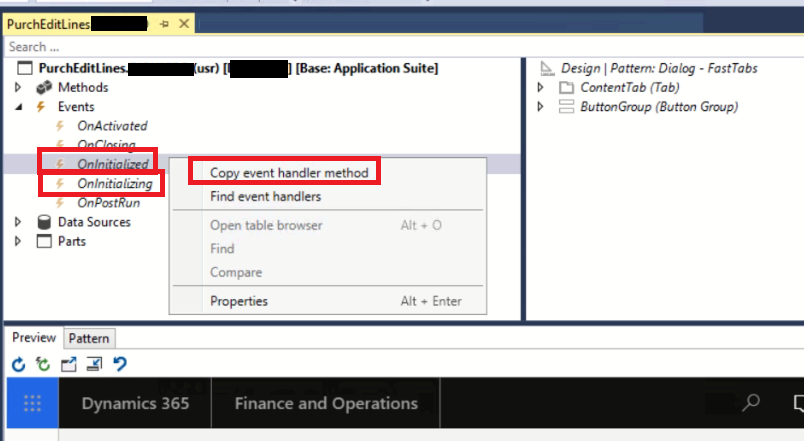
6. Create new class for handling PurchEditLines event handler


7. Copy event handler from form PurchEditLines Extension


8. Paste to the class
 
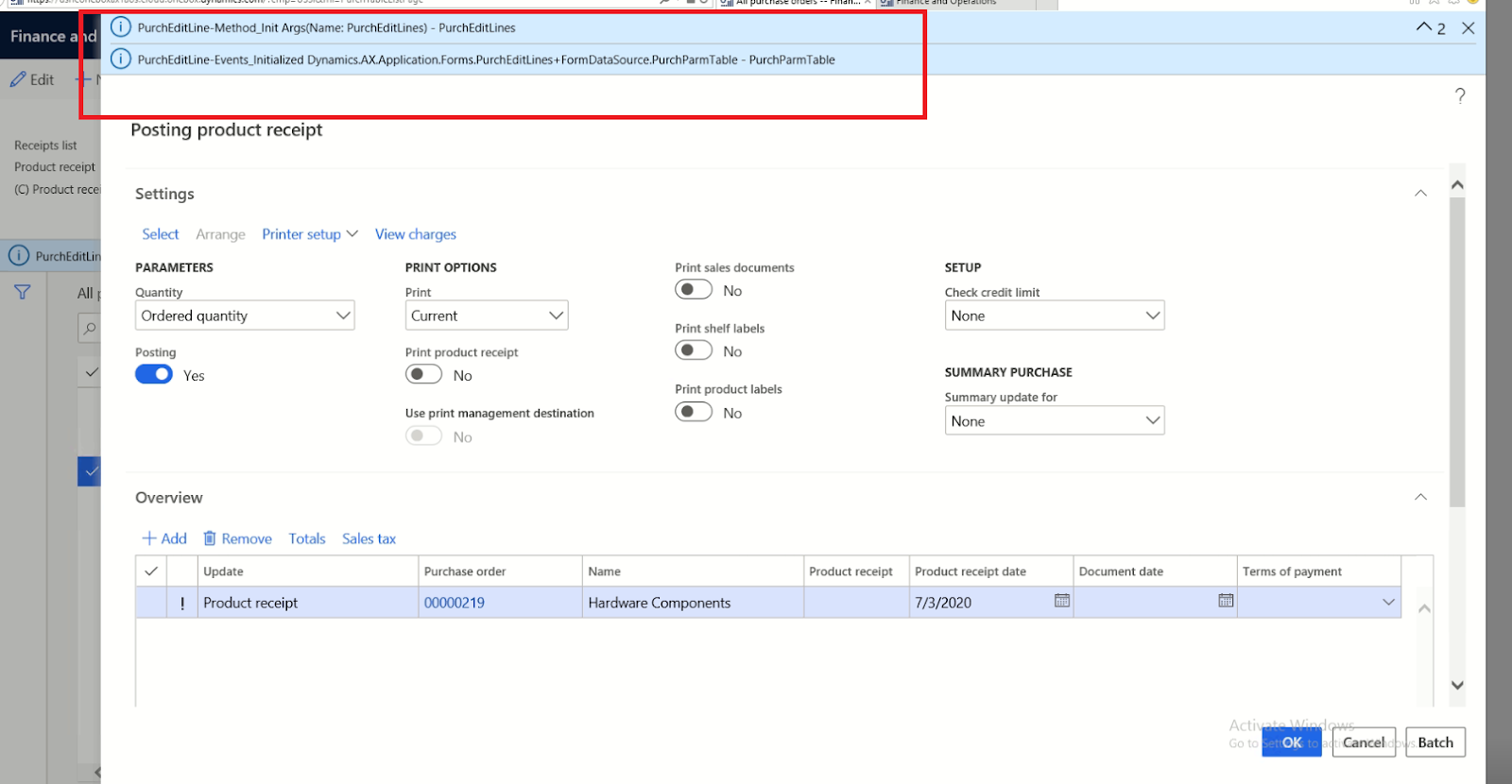
9. View Result